
No “clean up” button, no “safe to delete” labels. The only way to delete is the system’s Trash or Recycle Bin, so everything can be restored.
File names, paths, programs and connections never leave it: not in statistics, not in logs.
Every feature is a module of its own, switched on or off in Settings.
See where your space went
The first thing after a scan is the answer: “Users takes the most space here: 59%.”
Blocks and rings: two ways to look
Blocks lay your whole disk out on one screen: each block as big as its size, with its name and size written on it, coloured by where it is (system, apps, caches…) or what it is (videos, installers…). Point at one for a little card; right-click to open, preview or show it in its folder; arrow keys and Space work too. Rings unfold the structure layer by layer, with Ling in the middle, its eyes on the slice you point at.
Companion mode and Pro mode
Companion mode speaks plainly and shows the essentials. Pro mode gives you deeper charts, full lists, file counts and full paths.
Every disk, cloud drives, any folder
The system disk, external drives and your home folder, plus iCloud Drive, OneDrive, Google Drive, Dropbox and Box, counting files kept only online without downloading them.
More or less than last time
“Since 24 September: +12.0 GB in total”, and which folders quietly grew.
Largest files and duplicates
The largest files, filtered by kind if you like (videos, archives, installers…); files the system manages itself, like the hibernation file and virtual memory, sit in a group of their own with a note on what they are. Duplicates are found by content: size first, then the first and last bytes, and only then the whole file. Any of them can be shown in the blocks, among its neighbours. Listed, never deleted for you.
Fast mode on Windows
Reads the NTFS Master File Table directly to scan a whole disk in seconds; hard links are counted once. Administrator rights are asked for once, and the helper only reads.
Hundreds of GB · millions of files · seconds
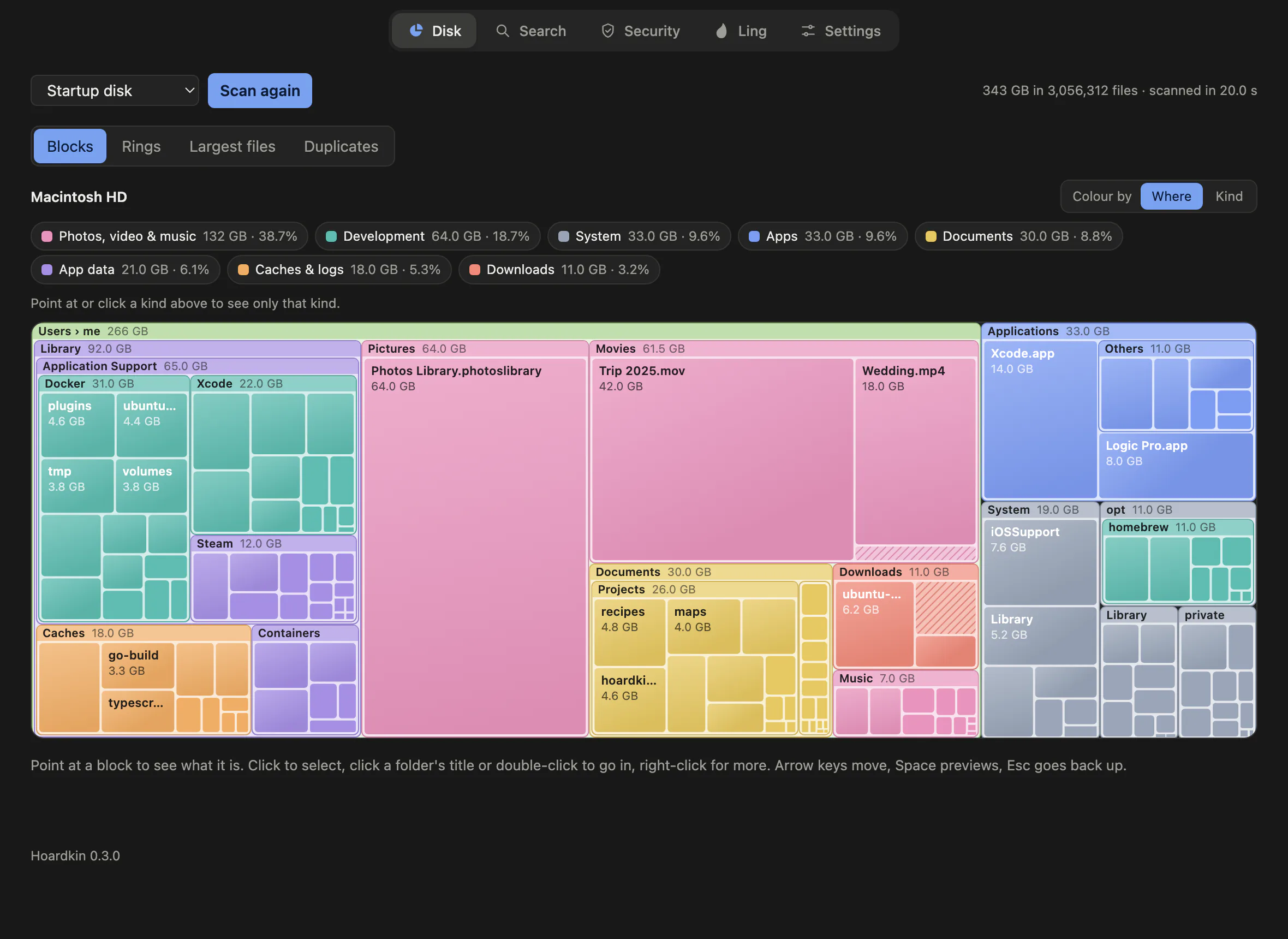
Pro mode: the blocks (dark)
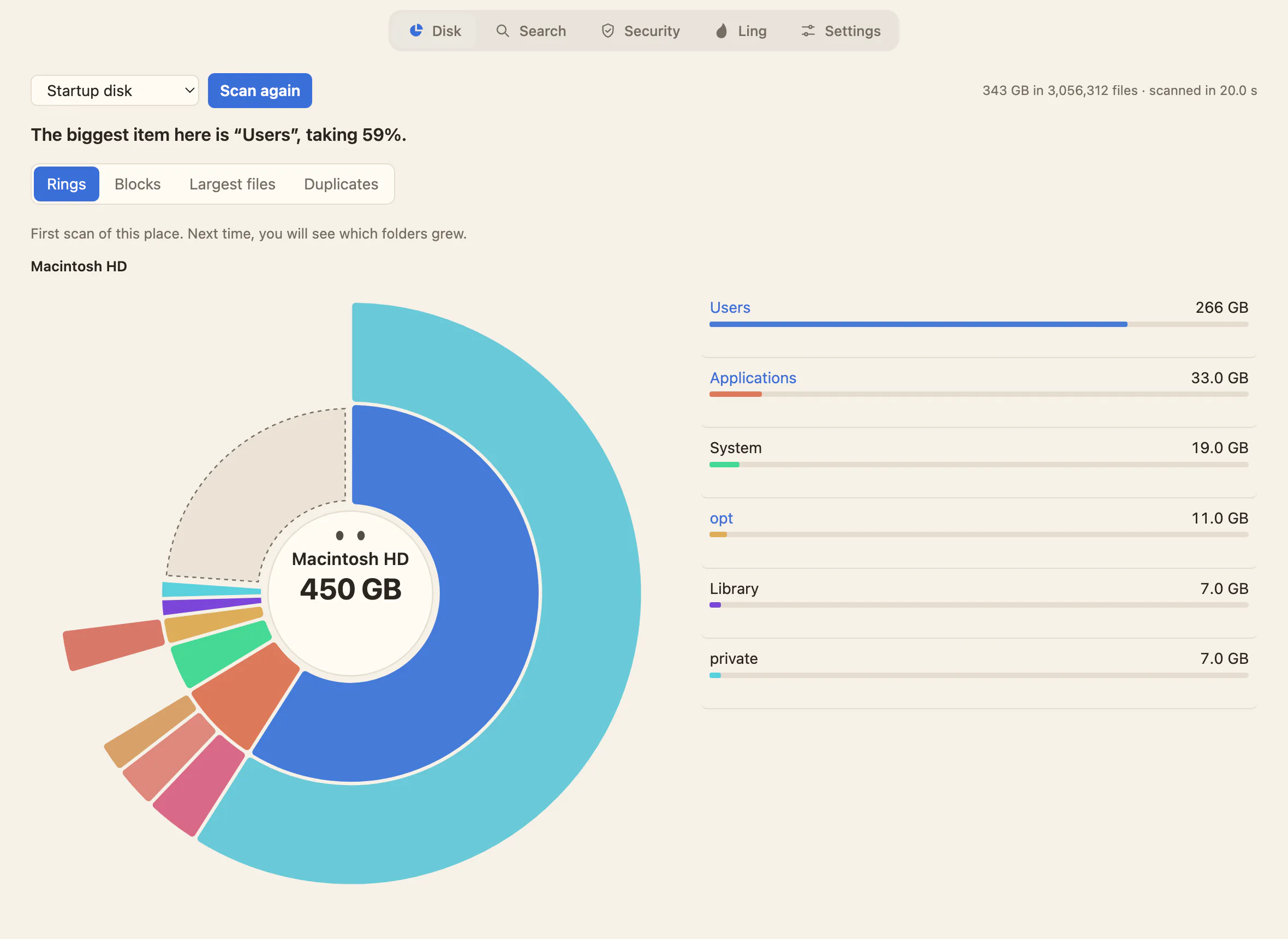
Companion mode: the rings, with the answer in the first line
Press. Found.
Press Alt + Space anywhere (⌥ Space on a Mac) and the search panel appears. Windows never had this.
Results as you type
Kind icons, location, size and date at a glance, with the matching letters in bold. Tab switches between names and contents.
Works like your file manager
Click to pick, double-click or Enter to open. Right-click to open, show in Explorer or Finder, preview, or copy the path.
Fast: an index of its own
In Windows fast mode, Hoardkin keeps every file name on every local disk in memory, current as the disk changes. It is ready a few seconds after start.
3 million names · 3–12 ms
Space to preview
Pick a result and press Space. On macOS, the system’s Quick Look; on Windows, Hoardkin’s own preview window for Word, Excel and PowerPoint (with Office installed), PDF, images and video, without leaving the search.
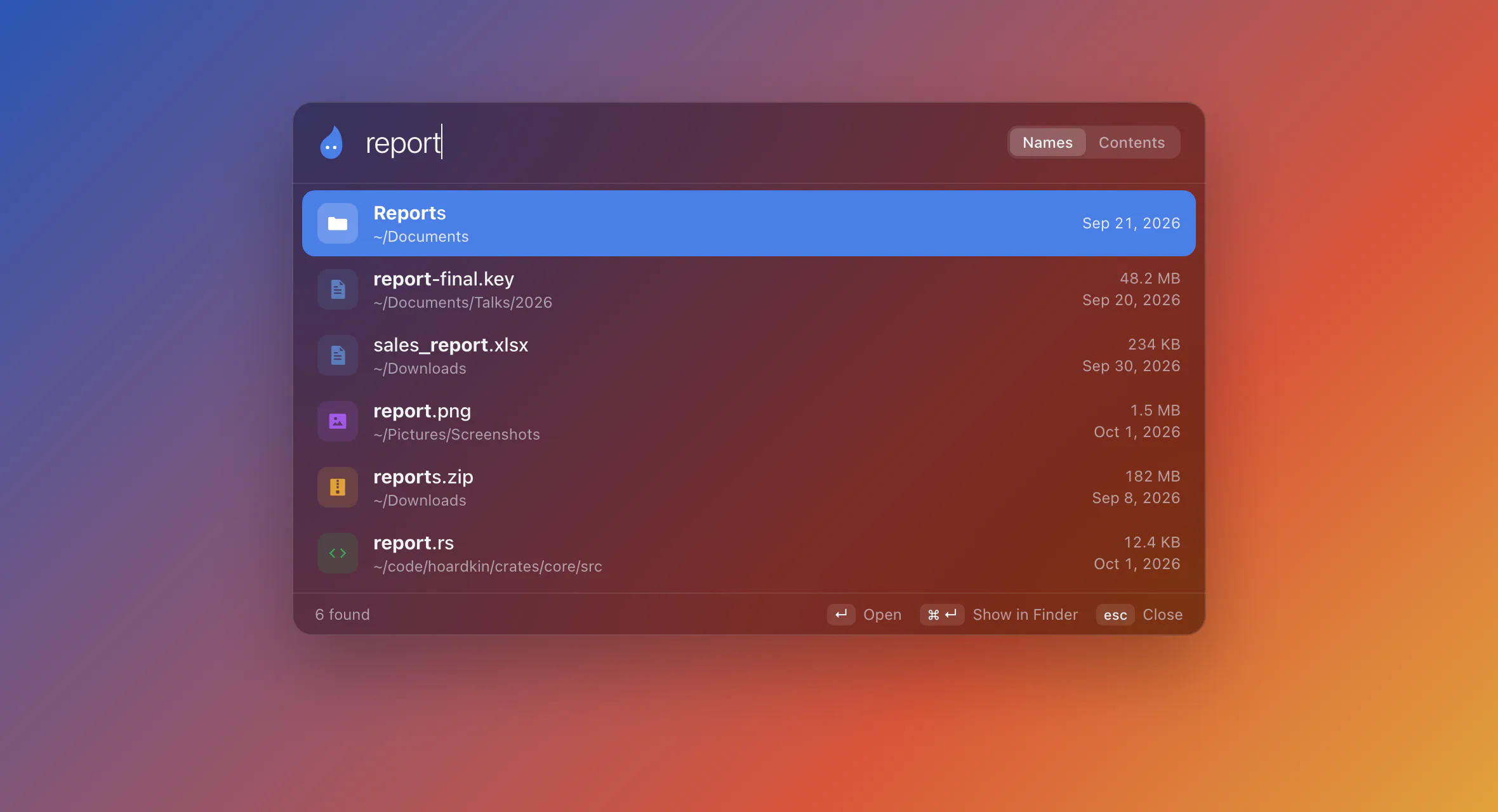
Quick search: type “report” and folders, documents, images, archives and code line up at once
A little one on your desktop
Ling walks along the bottom of the screen, stops for a rest and sits down. Clicks pass straight through it.
It reads the room
Ling sleeps while you are away, runs when the computer is busy, frets when the disk is nearly full and naps late at night. Each can be switched off.
It plays along
Rest the pointer beside it and it sits down to look at you; stroke it back and forth and a 💕 pops up; sweep the pointer across it and it is startled into running off, then slows down again. It only watches where the pointer is, so clicks still pass through; switch it off on the Ling page if you like.
Niuniu, and more
Niuniu is a real tabby cat. Ling's Hall has more Lings to download, or you can have one made after your own pet, free for now.
Also a lookout
Camera or microphone switched on, or a program quietly adding itself to startup: Ling tells you right away.
Ling wall
Share a photo of your own pet on the Ling wall. Photos are reviewed before they appear, and re-encoded without location or camera data.
Breaks and focus
After a long sit, your Ling walks to the middle of the screen and lies down to sleep. Three strengths; only a corner card in full-screen apps or Focus modes, nothing at all while presenting.
Keep awake
Keep the computer awake for a while, until downloads finish, or until it goes quiet. No setting is changed, and quitting Hoardkin ends it.
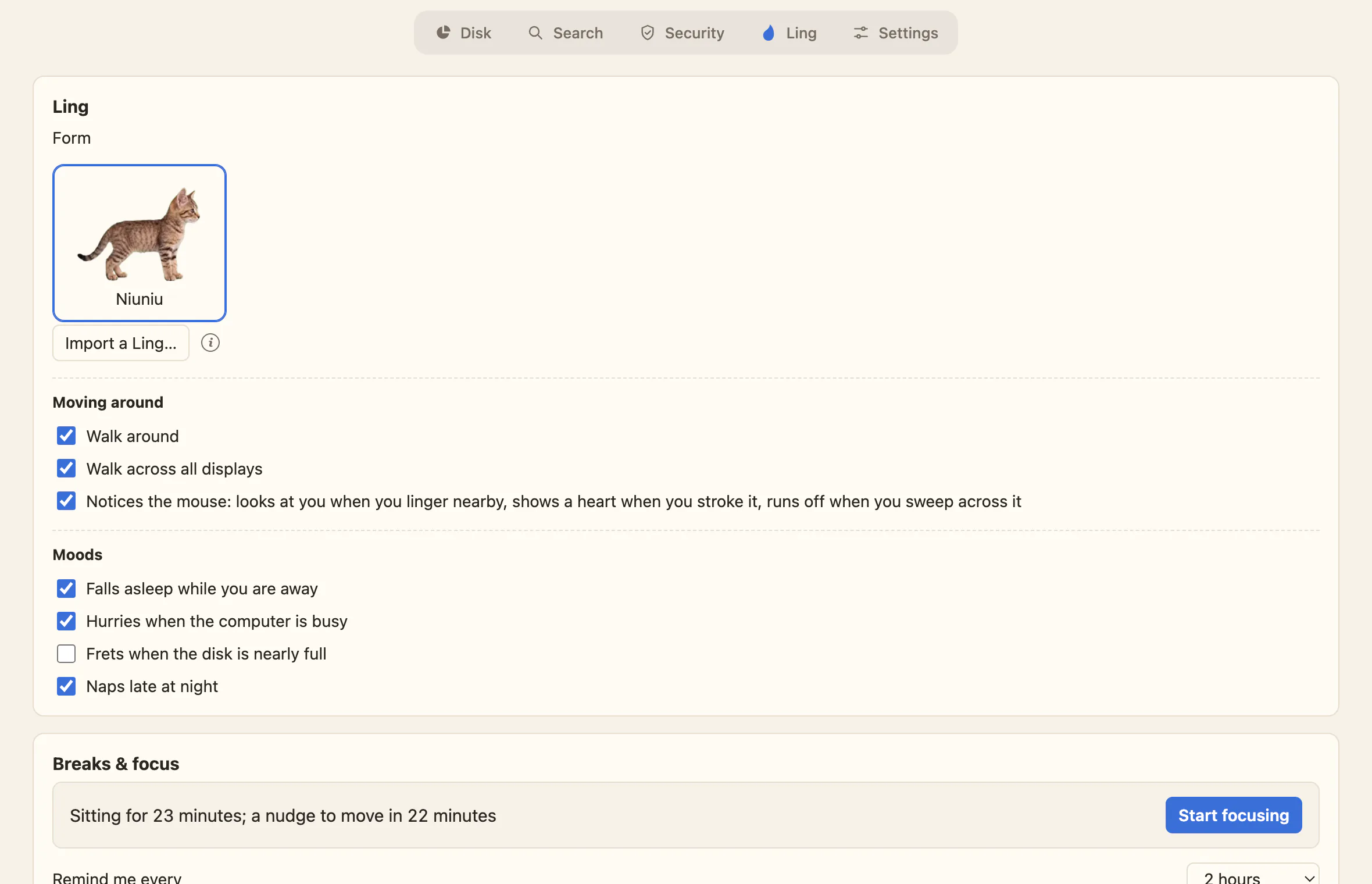
Ling’s settings: pick a form, and switch each mood on or off
See what this computer is doing
Show only: nothing is blocked, closed or removed. When something needs doing, Hoardkin takes you to the system’s own settings.
| Feature | What it tells you |
|---|---|
| Startup items | What starts on its own, and leftovers of removed apps, with signatures |
| New startup items | A program quietly added a startup item, background service or scheduled task, or an existing one now runs a different program |
| Camera and microphone | The moment either is used, with a record of who and when. The device is never opened and no permission is needed |
| Network connections | Which program is talking to which address |
| Ports | Which program listens on which port; end your own process after you confirm |
| Browser extensions | Every extension in every browser, and which can see or change a lot of your data |
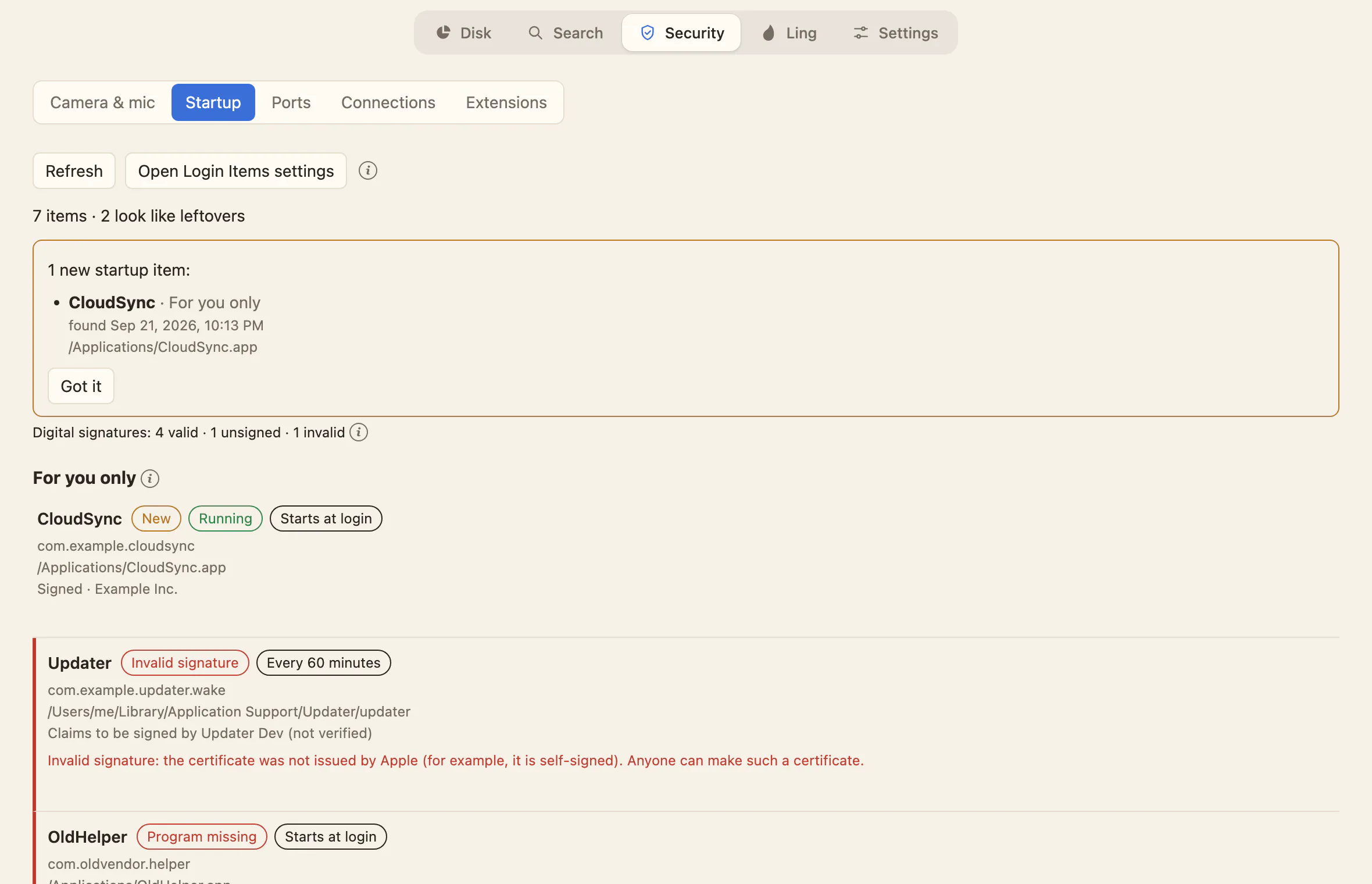
Startup items: what is new, badly signed or left behind, at a glance
Light, lovely, and true to its word
Light
Once the window is closed, only the tray icon stays. Limits it is held to: 35 MB of memory in the tray, 0.5% CPU when idle, installers of 25 MB (Windows) and 30 MB (macOS).
Lovely
Light mode is warm paper, not glaring white; dark mode is warm charcoal. On macOS the tabs are the title bar. It speaks your system's language: English, 简体中文, 日本語 or 한국어, and you can pick another in Settings.
Private
Hoardkin talks to two addresses only: update.hoardkin.com and ping.hoardkin.com. Usage statistics can be switched off and are off by default in Europe; the IP is not stored, and Settings shows exactly what would be sent. See the privacy policy.
Free, with no ads
Every feature is free, and there are no ads in the app. From 0.3 on, versions no longer expire; Hoardkin tells you when there is a new one.